Ender3: Difference between revisions
(Add photos of Coconut 1) |
|||
| (8 intermediate revisions by 2 users not shown) | |||
| Line 1: | Line 1: | ||
[[File:Coconut1_Ender3_1.4mm.jpg|thumb|right|360px|Coconut 1 in its corner of the MechArtLab]] | |||
'''Coconut 1 – the old workhorse with a 1.4 mm nozzle.''' Our original Ender 3 has been with SGMK since 2019. It now runs a huge 1.4 mm nozzle. It is not made for fine detail; it is made for '''fast prototypes''' and especially for '''vase mode'''. A 40 mm test box is done in about 11 minutes. | |||
It's rarely busy, so it's usually free. Go for it! 🚀 | |||
== Quick facts == | |||
* '''Location''' MechArtLab | |||
* '''Name''' Coconut 1 | |||
* '''Model''' Creality Ender 3 (original, at SGMK since 2019), Marlin firmware | |||
* '''Nozzle''' 1.4 mm (please don't change it) | |||
* '''Build volume''' 220 × 220 × 250 mm | |||
* '''Filament''' 1.75 mm PLA | |||
* '''Layer height''' 0.5 – 1.2 mm | |||
* '''Slicer''' PrusaSlicer 2.9 or newer, with the profile below | |||
* '''Printing''' from microSD card | |||
* '''Contact''' Aaron | |||
== | == Why vase mode? == | ||
In vase mode ("spiral vase") the printer draws a single wall in one continuous spiral from bottom to top. No infill, no top, no seam, no retractions. With a 1.4 mm nozzle you get: | |||
* '''Thick, sturdy walls''' (1.2 mm extrusion width) with only one perimeter | |||
* '''Huge layers''' (1 mm): tall objects grow really fast | |||
* '''Almost no failures''': no travel moves, no stringing | |||
Great for: vases, pots and planters, lamp shades, cups and pen holders, boxes, enclosures and quick size checks for prototypes. | |||
Not suited for: small details, text, objects with a closed top, multiple separate parts on one plate, anything that needs infill or a lid. | |||
== Photos == | |||
<gallery widths=240px heights=240px> | |||
File:Coconut1_Vase_Box_1.4mm.jpg|40 mm vase-mode box, 1 mm layers, ~11 minutes | |||
File:Coconut1_Display.jpg|Display with the nozzle warning label | |||
File:Coconut1_Ender3_Workplace.jpg|Coconut 1 and its workplace | |||
</gallery> | |||
== Print in 5 steps == | |||
* | # '''Get the profile''': Download [[File:SGMK_Ender3_1.4mm_Vase_PrusaSlicer.ini.zip]], unzip it and import the .ini in PrusaSlicer via ''File → Import → Import Config Bundle''. (On the public MacBook it is already installed.) | ||
* | # '''Select the presets''': | ||
#* Printer: ''Creality Ender-3 1.4mm'' | |||
#* Print settings: ''1mm Vase 1.4mm Nozzle'' | |||
#* Filament: ''3DJAKE ecoPLA @CREALITY - Aa'' (works for any normal PLA) | |||
# '''Slice''' your model and export the G-code to the microSD card. | |||
# '''Check the bed''': clean the bed (no fingerprints), and check that it's level with a sheet of paper if the first layer looks bad. | |||
# '''Print''' from the card in the printer menu. Watch the first layer! | |||
== Profile details == | |||
{| class="wikitable" | |||
! Setting !! Value | |||
|- | |||
| Layer height || 1.0 mm (first layer 0.5 mm) | |||
|- | |||
| Extrusion width || 1.2 mm | |||
|- | |||
| Perimeters / infill || 1 / 0 % (spiral vase) | |||
|- | |||
| Bottom layers || 2 | |||
|- | |||
| Speed || first layer 20 mm/s, flow limited to 15 mm³/s | |||
|- | |||
| Temperature || 215 °C nozzle / 60 °C bed | |||
|- | |||
| Cooling || fan 100 % from layer 2 | |||
|- | |||
| Retraction || 5 mm @ 60 mm/s (bowden) | |||
|} | |||
''' | == Tips == | ||
* Scale small models up: at 1.4 mm nozzle size, anything smaller than ~30 mm loses its shape. | |||
* Vase mode only works with '''one object''' at a time. | |||
* Models must be "solid" (closed). PrusaSlicer hollows them out automatically. | |||
* If walls are too weak: increase the extrusion width in ''Print Settings → Advanced'' up to 1.6 mm. | |||
== | == Maintenance notes == | ||
* The Z endstop has been adjusted for the 1.4 mm nozzle (October 2026). No babystepping needed. | |||
* Please do not change the nozzle. If something is wrong, tell Aaron or write in the chat. | |||
== History == | |||
Older instructions (Cura, OctoPrint) are outdated and have been removed. See the page history if you need them. | |||
[[Category:MechArtLab]] | |||
Latest revision as of 02:17, 17 October 2026

Coconut 1 – the old workhorse with a 1.4 mm nozzle. Our original Ender 3 has been with SGMK since 2019. It now runs a huge 1.4 mm nozzle. It is not made for fine detail; it is made for fast prototypes and especially for vase mode. A 40 mm test box is done in about 11 minutes.
It's rarely busy, so it's usually free. Go for it! 🚀
Quick facts
- Location MechArtLab
- Name Coconut 1
- Model Creality Ender 3 (original, at SGMK since 2019), Marlin firmware
- Nozzle 1.4 mm (please don't change it)
- Build volume 220 × 220 × 250 mm
- Filament 1.75 mm PLA
- Layer height 0.5 – 1.2 mm
- Slicer PrusaSlicer 2.9 or newer, with the profile below
- Printing from microSD card
- Contact Aaron
Why vase mode?
In vase mode ("spiral vase") the printer draws a single wall in one continuous spiral from bottom to top. No infill, no top, no seam, no retractions. With a 1.4 mm nozzle you get:
- Thick, sturdy walls (1.2 mm extrusion width) with only one perimeter
- Huge layers (1 mm): tall objects grow really fast
- Almost no failures: no travel moves, no stringing
Great for: vases, pots and planters, lamp shades, cups and pen holders, boxes, enclosures and quick size checks for prototypes.
Not suited for: small details, text, objects with a closed top, multiple separate parts on one plate, anything that needs infill or a lid.
Photos
-

40 mm vase-mode box, 1 mm layers, ~11 minutes
-

Display with the nozzle warning label
-
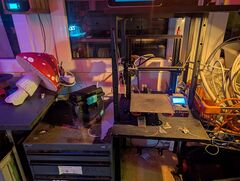
Coconut 1 and its workplace


Print in 5 steps
- Get the profile: Download File:SGMK Ender3 1.4mm Vase PrusaSlicer.ini.zip, unzip it and import the .ini in PrusaSlicer via File → Import → Import Config Bundle. (On the public MacBook it is already installed.)
- Select the presets:
- Printer: Creality Ender-3 1.4mm
- Print settings: 1mm Vase 1.4mm Nozzle
- Filament: 3DJAKE ecoPLA @CREALITY - Aa (works for any normal PLA)
- Slice your model and export the G-code to the microSD card.
- Check the bed: clean the bed (no fingerprints), and check that it's level with a sheet of paper if the first layer looks bad.
- Print from the card in the printer menu. Watch the first layer!
Profile details
| Setting | Value |
|---|---|
| Layer height | 1.0 mm (first layer 0.5 mm) |
| Extrusion width | 1.2 mm |
| Perimeters / infill | 1 / 0 % (spiral vase) |
| Bottom layers | 2 |
| Speed | first layer 20 mm/s, flow limited to 15 mm³/s |
| Temperature | 215 °C nozzle / 60 °C bed |
| Cooling | fan 100 % from layer 2 |
| Retraction | 5 mm @ 60 mm/s (bowden) |
Tips
- Scale small models up: at 1.4 mm nozzle size, anything smaller than ~30 mm loses its shape.
- Vase mode only works with one object at a time.
- Models must be "solid" (closed). PrusaSlicer hollows them out automatically.
- If walls are too weak: increase the extrusion width in Print Settings → Advanced up to 1.6 mm.
Maintenance notes
- The Z endstop has been adjusted for the 1.4 mm nozzle (October 2026). No babystepping needed.
- Please do not change the nozzle. If something is wrong, tell Aaron or write in the chat.
History
Older instructions (Cura, OctoPrint) are outdated and have been removed. See the page history if you need them.